OneCloud Connect | Android | How to Clear Cache or Data
OneCloud Connect | Android | How to Clear Cache or Data

Please Note: Depending on the phone model depends on the accuracy of the steps below. Additionally, below will demonstrate two different ways of accessing the location of clearing cache and data.
First Path to Clearing Cache or Data
Step 1: Hold Down on OneCloud Connect Icon on the Home Page
(This will prompt multiple options in which you select the (i) icon located to the right of the application name)
Step 2: Go to Storage within App Info
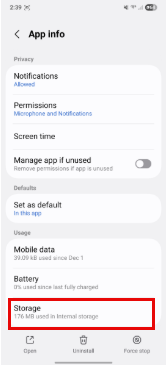
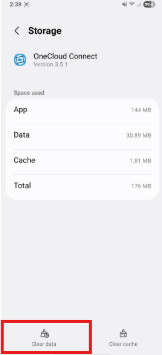
Step 3: Select Clear Data Button
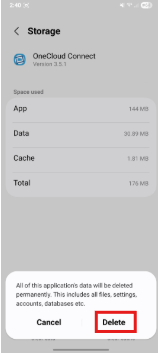
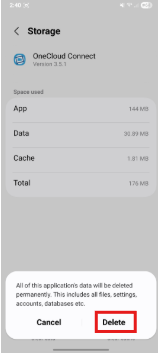
Step 4: When Prompted Select Delete after Selecting Clear Data
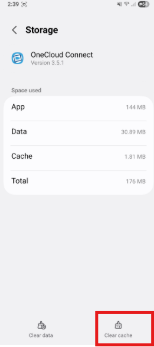
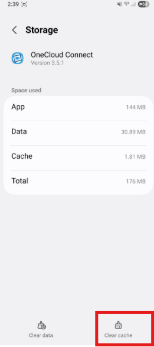
Step 5: Select Clear Cache Button
Second Path to Clear Data and Cache
Step 1: Launch Settings and go to "Apps"
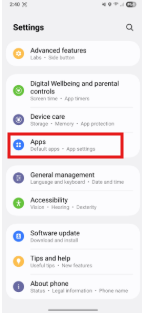
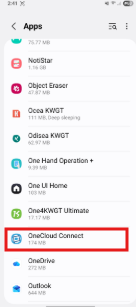
Step 2: Go to OneCloud Connect
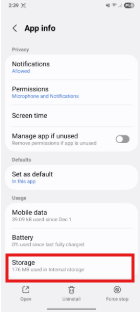
Step 3: Go to Storage within App Info
Step 4: Select Clear Data Button
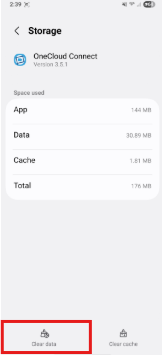
Step 4: When Prompted Select Delete after Selecting Clear Data
Step 5: Select Clear Cache Button
Please Note: Once this is complete you have successfully cleared the cache and data and continue back to the application. If you have any questions regarding the process or issues, please feel free to reach out to OneCloud Support